Go to shop.milkmoovement.io
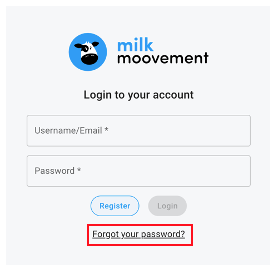
Underneath the ‘Login’ button, click the link that says ‘Forgot your password?’
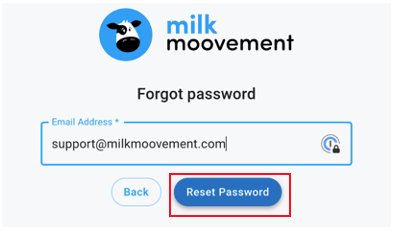
Enter the email address associated with your Cargill Feed Shop Account and select ‘Reset Password’
o Note: This will send a link to reset your password to the email address used to create your Cargill Feed Shop account
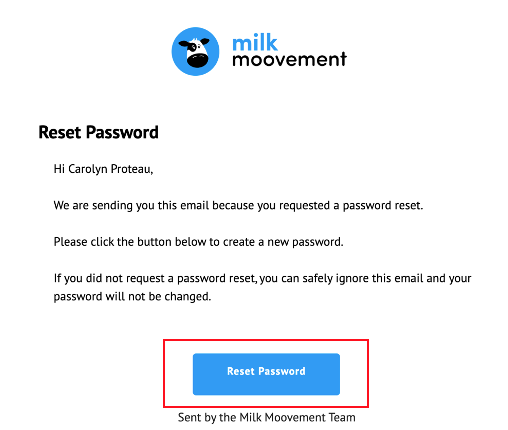
In your email inbox, you will see an email from [email protected]. Open the email and click on the blue bar that says ‘Reset Password’. This will open a new window.
o Note: If you do not see this email in your main inbox, check your junk/ spam folder
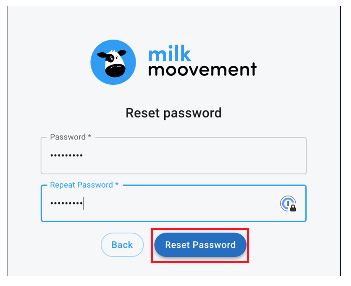
Enter your new password and click on ‘RESET PASSWORD’
o Note: Password must be a minimum of 8 characters long and contain at least one number
Once a new password has been set via these steps, you will be able to use that password to log into your Cargill Feed Shop Account moving forward.
Questions about Cargill Feed Shop functionality or technical issues?
While on any page within the Milk Moovement portal, you will also see our resident cow, Mooreen, in the top right corner. By clicking on Mooreen, you will have access to our self-service Article Library and immediate assistance from our AI assistant. Our live agent support team is available 7:00 AM–9:00 PM ET.
Questions about setting up Cargill account, adding new products, or order adjustments?
Send email to [email protected].